Questman is a self-hosted "life hub" with a cyberpunk skin. It takes the scattered inputs of a day (quests, habits, chores, projects, workouts, vitals, media, finances, and the people you keep meaning to call) and turns them into a single ranked board for the day, wrapped in an XP and currency economy so that doing the work feels a little like playing a game. It is single-user, runs on your own hardware in Docker, and shares nothing with anyone. The name is short for Quest Manager, with a nod to the Walkman.
This page is the full manual. If you just want the quick version, jump to Install and run or grab the code. The blog post that introduced it has the backstory.
Goals and philosophy
I built Questman for myself. I have ADHD, diagnosed as an adult, and I have spent years trying to assemble a toolkit that keeps me organized. Nothing sticks for more than about a week before I drift back to my ad-hoc ways. The thing that always nagged at me is that I can happily grind mundane quests in a video game for hours, but I cannot make myself look at a real-life to-do list.
My hypothesis is that the missing piece is not the list, it is credit and rewards. I need a system that confirms I actually did the thing, plus some small earned payoff. So Questman is, plainly, a to-do dashboard disguised as a game to trick my brain into getting things done. The dopamine is superficial, but it is real, and it is the same hit I get from clearing a quest in a game.
The aim is a one-stop-shop for managing and logging a day. Every domain you care about feeds one ranked "Today" board, so you never open four apps to answer "what should I do right now." The more data you give it, the better its plan gets. A few principles hold the whole thing together:
- The server owns the economy. XP and the in-app currency are minted only by the server, derived from append-only ledgers that cannot drift. The AI can suggest and theme quests, but it can never mint a reward.
- AI is optional color, never the core. Every AI feature is opt-in and off by default. With nothing configured, the rules-based engine still builds a perfectly good day. You can also point it at a local model so no data leaves your network.
- Self-hosted and private. One user, one SQLite file, on your own box. No telemetry, no analytics. No bank or account integration; finance data comes in by file upload only.
- The cyberpunk look is non-negotiable. Clipped panels, neon, CRT scanlines, hex badges. It is a battle station, not a reskinned admin panel.
- Closed-loop by design. Doing the real thing clears the matching quest and pays out automatically. Log the workout, check the habit, advance the project, pay the bill, and the quest closes itself. The loops are guarded so a double-tap or a check-then-undo never double-pays.
I will be honest that this was built primarily for me, and that I am still figuring out whether the trick holds up over time. It feels good now. Ask me again in a month. But I figured other people fight similar battles, so the code is public and anyone can run or extend it.
Questman was built largely in a single day using Claude Code and Claude Design, both running on Fable 5. It started life as FinDash, a cyberpunk finance dashboard, and pivoted into a full life hub; the finance views still ship as one module among many.
How the day works
The loop is the same every day. You open the app and the engine has already built your day: every domain you track feeds candidate quests into one day planner, which ranks them and fits them to a time budget. You complete, advance, skip, or reroll quests, and you can drop into the Focus Chamber for a distraction-free timer. Completing work earns XP (permanent progression) and eddies (€$, a currency you spend in the shop). A full-clear day ramps a multiplier and banks downtime credits; a missed day cools it.
The planner suggests what to do, never when. It produces a ranked list and marks each quest as in the plan (fits today's budget) or a side job (overflow). The default budget is 4 hours on weekdays and 10 on weekends, and if you connect a calendar, your real busy time is subtracted from it.
The most important idea is the closed loop. You do not check quests off separately from doing the underlying thing. Finishing the real action (logging a habit, completing a project task, paying a bill, pinging a contact) clears its quest and pays out, and clearing the quest writes the underlying action. Either side closes the loop, and the reward lands exactly once.
The Today board
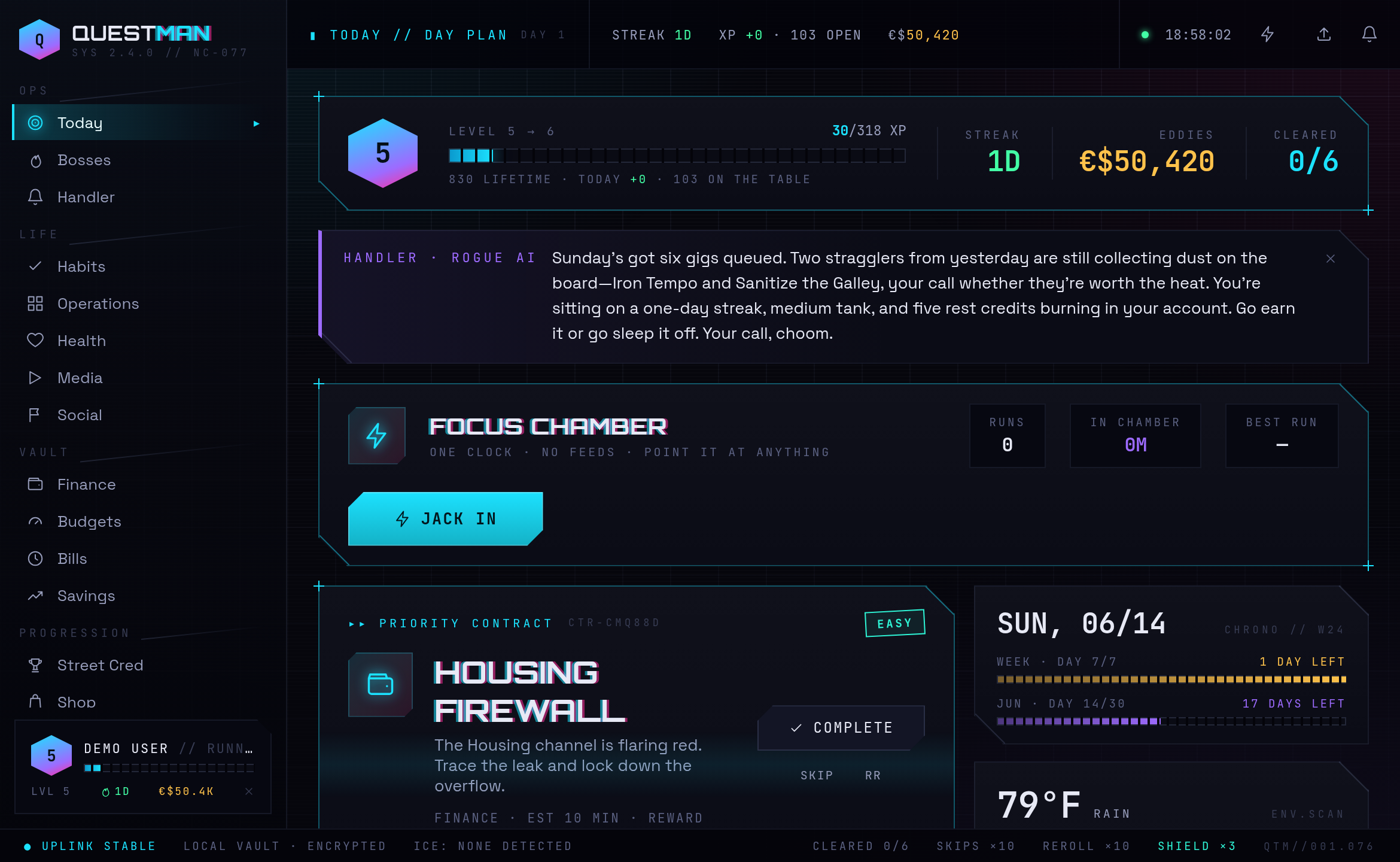
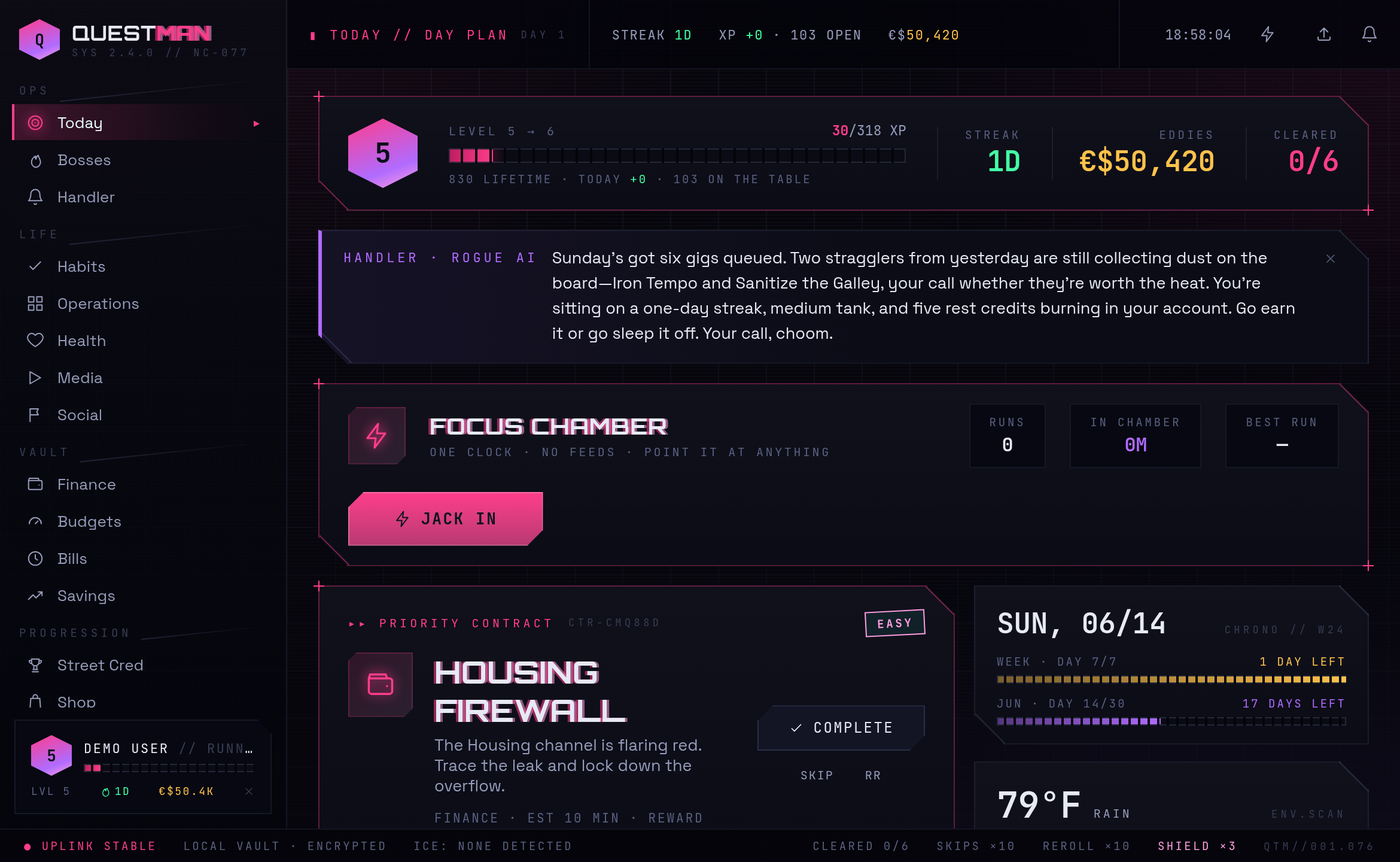
Today is the hub. Top to bottom, it shows:
- HUD strip. Your level badge and XP bar, plus tiles for your current streak, eddie balance, and quests cleared today.
- Handler card. The AI Handler's latest line, in the voice of whichever persona you have equipped. Only appears when the AI Handler is enabled. Dismiss it and a fresh line brings it back.
- Focus Chamber strip. A full-width JACK IN button with today's run count, minutes in the chamber, and your best run. The chamber belongs to the whole day, not one task.
- Priority Contract. The single top-ranked quest, rendered large. Stamps flag it as must-do, or as an outdoor task on its last clear day before the weather turns. Its action is COMPLETE, with small SKIP and RR (reroll) buttons.
- Contract Ledger. The rest of the in-plan quests, plus the day's cleared and skipped rows. Counter quests show pips and a
+1button; one-shot quests show a check, skip, and reroll. A carried quest wears aCARRIED ×Ndtag. - Right rail. A date/runway panel, a weather scan (high, low, rain, wind, best outdoor window, tomorrow's outlook), the Power Cell energy tile, your side jobs (quests that did not fit the budget but are still actionable), and a terminal-style session log of the day's XP grants and focus runs.
- City Feed. On wide screens, a third column of self-hiding panels: today's calendar agenda, active boss HP bars, new pattern insights with inline accept/dismiss, and cold contacts with a one-tap ping.
Working a quest
- Complete. Marks the quest done, runs the closed-loop side effects, and pays XP plus eddies. Completing twice still pays once.
- Advance (+1). For counter quests with a target above 1. XP drips proportionally per check-in; reaching the target completes it and pays the remainder plus a 20% bonus.
- Skip. Drops a quest with no penalty and no XP. Costs one skip token. A skip is neutral, so it does not break your streak.
- Reroll (RR). Swaps the quest for a different candidate that is not already on the board. Costs one reroll token, but only if a fresh alternative actually exists; otherwise the token is preserved.
Tokens refill once per week (three skip, one reroll, with caps), and you can buy more in the shop. At the first app-open each day, must-do and carry-over quests (chores) roll forward; daily habits do not carry, because a missed day is a missed day.
The Focus Chamber
JACK IN opens a dedicated, distraction-free page: one huge clock, no nav, no feeds. You can leave it counting up, or set a 15, 25, 40, or 55 minute limit (or a custom one) to count down. Pick what you are working on, or let it inherit the priority contract.
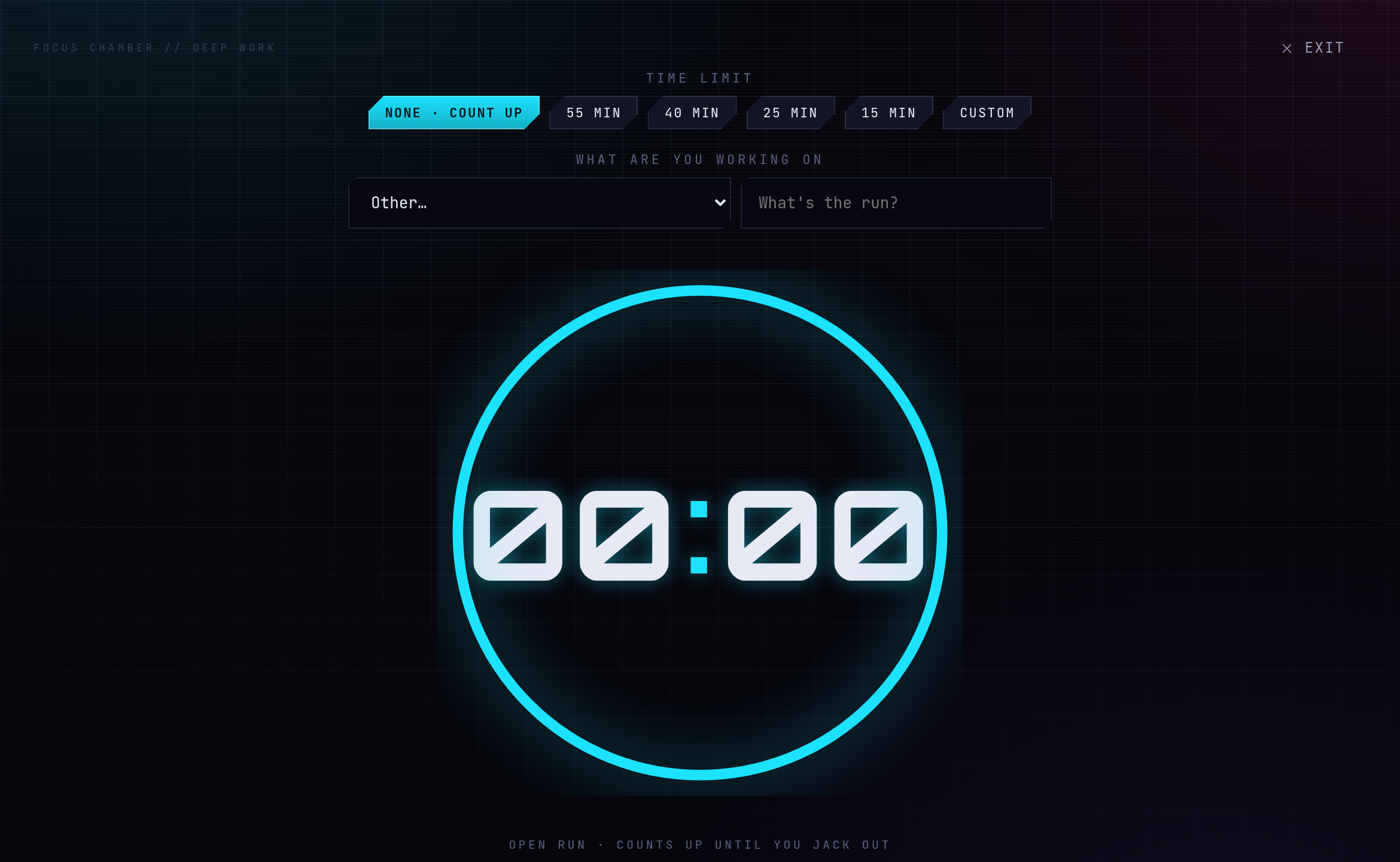
A countdown does not auto-stop at zero. Past the limit it flips to a red overtime counter and keeps going, because stopping the timer is not the same as stopping the work. Jacking out always logs the real minutes elapsed. Focus time mints no XP on its own; it is informational, and when the target is a quest, the minutes feed that quest's estimate accuracy so the planner gets smarter about your real pace. An in-progress run is mirrored to local storage, so an accidental reload drops you straight back in with the clock intact.
Bosses
Big goals become bosses with a segmented HP bar. There are two directions: grind down (HP starts full and drains toward zero, for debt, projects, or challenges) and charge up (starts empty and fills toward a target, for savings). You deal damage with manual hits (log a payment, a contribution, or progress), and a boss linked to a project also takes automatic damage each time you clear one of that project's milestones.
Every boss has a PAYMENT / BALANCE toggle. In payment mode you enter the amount you paid or contributed; in balance mode you enter the new absolute value and the server works out the change, which is handy when it is just easier to type in your current debt balance. Hits never award anything. The reward is server-owned and pays out only on defeat, exactly once ever, so reviving and re-killing a boss will not re-pay you.
Life modules
The "life" side of the app is where you define the real things you want to track. Each module stores your data and feeds the quest generator.
Habits and anti-goals
The Habits screen holds two kinds of recurring trackable, stacked on one page.
Daemons are good habits running in the background. Each has a cadence (daily, weekly, custom days, or one-off), a difficulty that auto-fills an XP value, an optional time estimate, and an optional "minimum days between" throttle so it will not nag you again too soon. Mark one outdoor and you can set weather thresholds (dry days required, max rain, temperature band, max wind), so it only surfaces as a quest when conditions fit. Checking a daemon awards XP and eddies, bumps the streak, and clears any pending quest tied to it. Unchecking reverses the exact amount that was banked.
ICE entries (anti-goals) are things to avoid, and they work the opposite way: days are clean by default. You do nothing to succeed, and the avoidance streak and its reward are credited automatically each night. When you slip, you press BREACH, which resets the streak to zero and pays nothing. The red breach marker is the only sting, which is plenty.
Operations
Operations consolidates projects and chores. A project holds objectives (one-off tasks), recurring chores attached to it, and milestones (which pay a bonus once, ever, and damage any linked boss). Turn on SEQUENCED mode and the objectives become a step track where only the current step is actionable and later steps stay locked until you get to them. Completing a project quest from the Today board checks the underlying task, and checking the task here completes the quest; the XP is paid once by whichever side fires first. Loose chores with no project live in an Uncategorized bucket, and an overdue recurring chore picks up a "rotation slipping" nudge.
Health (Biomonitor)
The Health screen combines daily vitals and workouts. You log a configurable set of metrics each day (weight, sleep, mood, water, steps, blood pressure, resting heart rate, and any custom ones), and submitting the log clears the day's check-in quest. Trend charts cover any window from a week to all-time, with healthy-range bands. Workouts log with a type, intensity, duration, and optional per-exercise sets, and pay XP immediately. The Weekly Protocol strip lets you schedule training by day of week; each planned slot becomes a "scheduled workout" quest, and logging any session clears it. If you wire up phone health sync, a SYNC PHONE button appears and prefills today's vitals from your watch.
Media (Braindance)
Braindance is a planner-first backlog of books, movies, shows, and games. Add a title and hit AUTO-ESTIMATE to pull its length (page counts from Open Library, runtimes and episode counts from TMDb, game length from IGDB), or set it by hand. The WHAT NOW planner answers "what fits in N minutes" with concrete, medium-specific suggestions ("watch two episodes," "read about 30 pages," "play a 45 minute session"), each with a JACK IN button into the focus timer. It tracks your real reading and watching pace over time to sharpen the estimates.
Media is gated by the downtime economy: a backlog item is not on your plate until you spend an R&R credit to pull it onto the active shelf, and credits are earned by clearing a full day. Logging time past your daily downtime budget spends a credit; if you are out, it still lets you log, but records a breach against an anti-goal of your choosing. Earn your leisure.
Social (Crew)
Crew tracks the people you want to stay in touch with. Give a contact a cadence (weekly, monthly, quarterly, yearly, or none) and the app watches the time since you last connected, fading the signal from green to amber to red as they go cold. When anyone is overdue, the day gets one gentle "reach out to someone" nudge that names the most-neglected person. A one-tap REACHED OUT button, or a fuller log entry (channel, who reached out, a note), advances their clock and clears the quest.
The Vault (finance)
The Vault is a finance hub by way of a manual ledger. There is no bank integration on purpose. You import statements, clean them up, and the system turns the picture into budgets, bill tracking, savings missions, and quests.
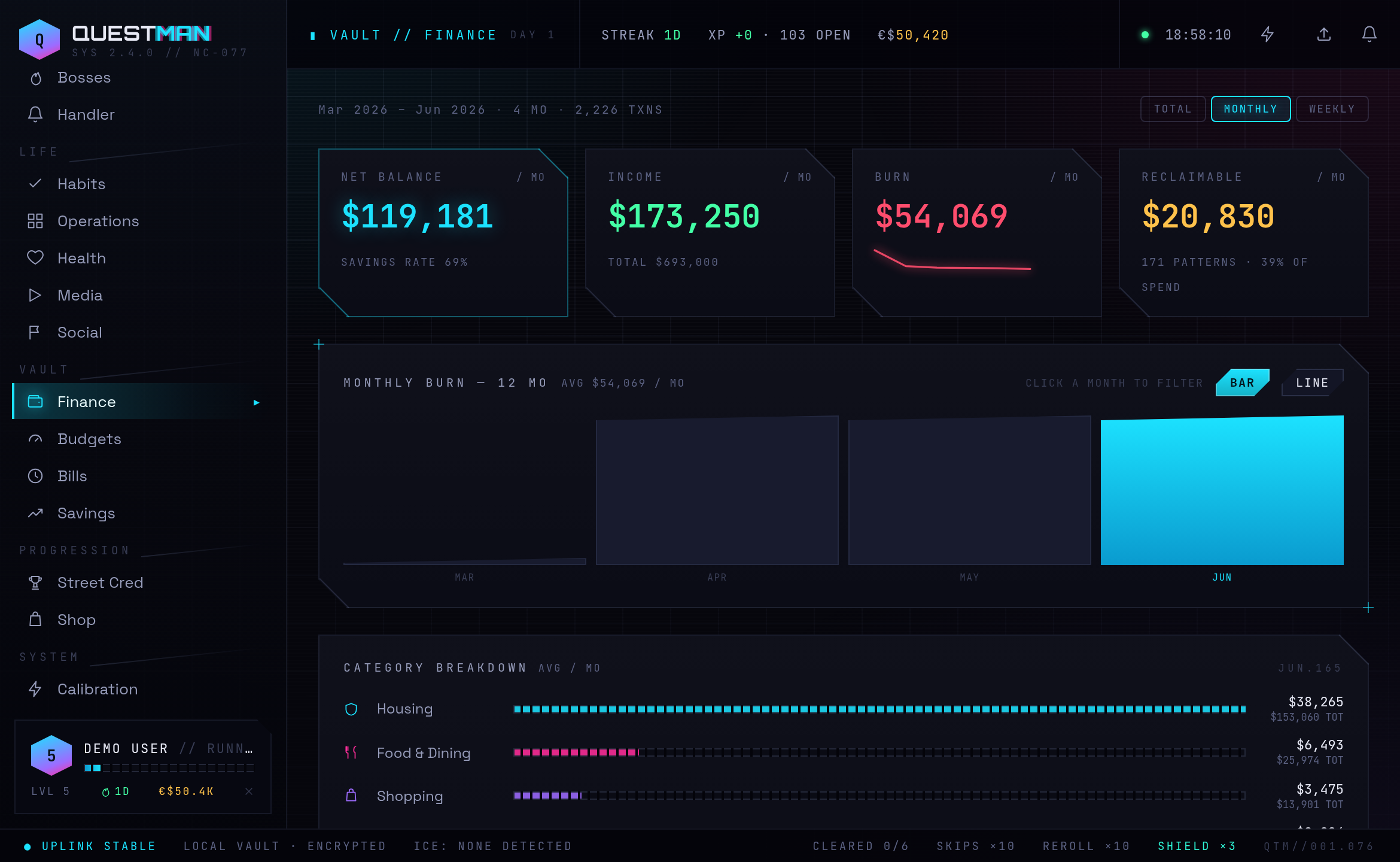
- Import. Drag a CSV or Excel file onto the Finance Terminal. It auto-detects the date, description, amount, and account columns by header name; positive amounts are income, negative are expenses. Uncategorized rows are auto-classified by your rules first, then by matching against your own history, then by keyword as a last resort. A category you set by hand is never overwritten.
- The transaction log. Filter by account, search, or by clicking a month or category in the charts above. Multi-select gives you a bulk bar to recategorize, mark transfers as excluded, link rows to a project or chore, or delete. Excluding is non-destructive: the row stays visible but greyed, and drops out of every total, budget, and chart. This is how you net out transfers between your own accounts without deleting anything.
- Budgets and envelopes. Give a category a monthly cap and it becomes an envelope with spend-to-date, remaining, and a status. The board ranks categories most-under-budget first, so coming in under cap is a competition you can win, and a track-record grid shows how often you land under each one. The worst category over 90% of its cap spawns a "budget breach" quest.
- Bills and subscriptions. An auto-detector scans your history, groups recurring charges, classifies them weekly or monthly, and ranks them by annual cost. You confirm the ones to track. A monthly bill due soon spawns a "pay this" reminder quest that stamps the bill paid when you complete it. A subscription audit lists everything you are paying for with a one-click cancel, framed as killing running processes.
- Savings missions. A read-only view derived from your budgets and subscriptions, showing the real surplus you are preserving each month.
Progression and the economy
Questman runs on two currencies, both earned only by doing real things, both minted only by the server, and both derived from append-only ledgers that are the actual source of truth.
- XP is permanent progression. It drives your level on a curve where early levels come fast and late ones stretch out. You earn it but never spend it.
- Eddies (€$) are spendable. A cleared reward pays eddies alongside its XP, plus a small bonus for harder tasks.
- Overclock is a multiplier that rewards consistency. Each full-clear day ramps it (boosting eddie earns only, never XP, capped at double) and banks a downtime credit; a missed day cools it back down.
- Tokens and credits. Skip and reroll tokens refill weekly and are buyable. R&R credits, earned by clearing full days, pay for guilt-free media downtime. A bought Streak Shield auto-fires to forgive a single missed day.
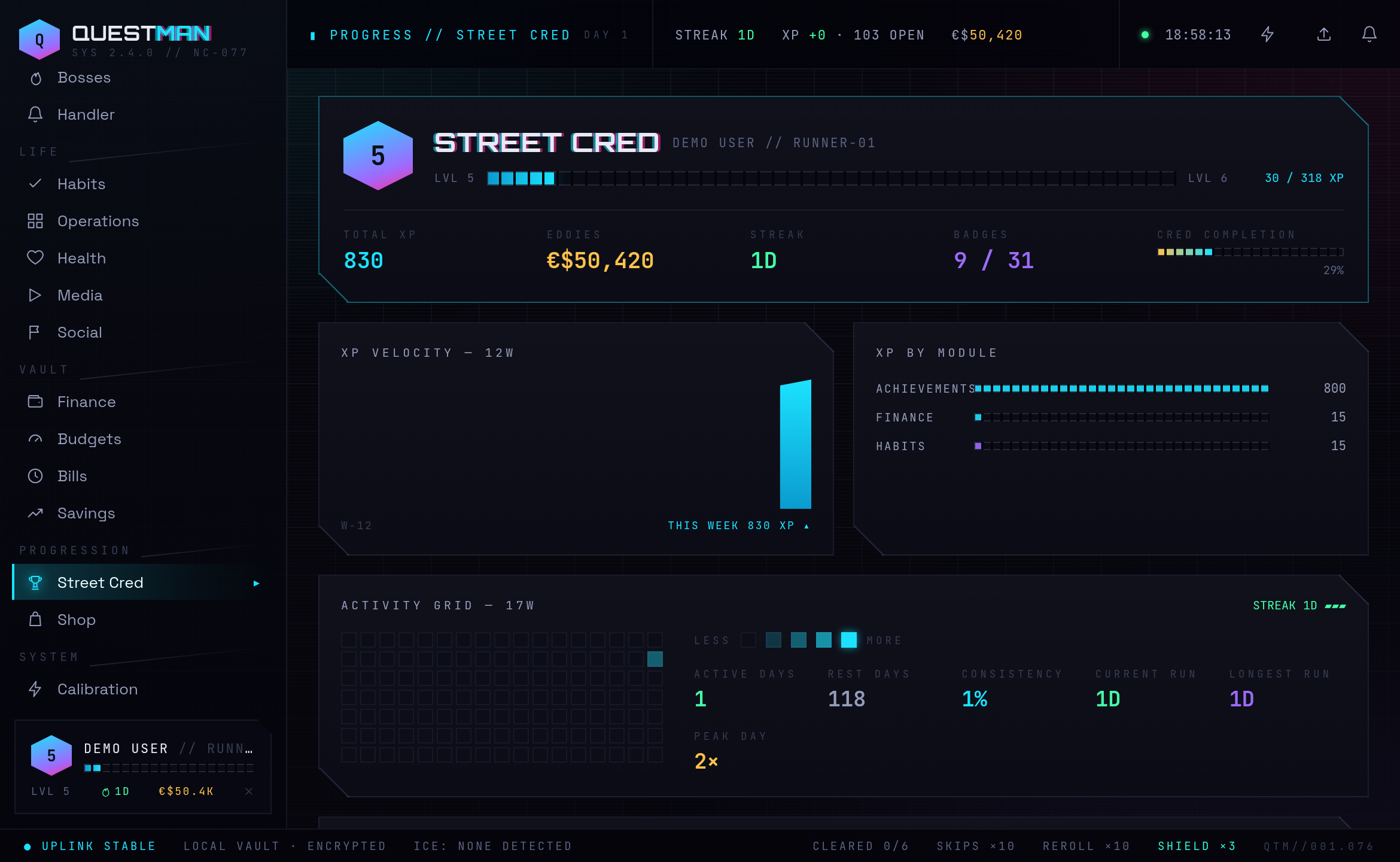
The Street Cred page is the command center: an achievements wall (tiered badges that unlock automatically as you hit milestones), an XP velocity chart, per-module XP, a GitHub-style activity heat grid, and the immutable data-shard ledger of every grant. Crossing a level throws up a short ceremony showing where your XP came from.
The Night Market is the shop and the main place eddies go. It is the eddie sink: neon skins that recolor the entire interface live, deeper OS shells, stackable ambient effects, focus-timer faces, alternate Handler personas, cosmetic data pets, vanity titles, and consumable supply (token packs, the streak shield, an eddie-doubling chip, loot crates). Skins, shells, and gear auto-equip when you buy them; visual effects stack and toggle freely.
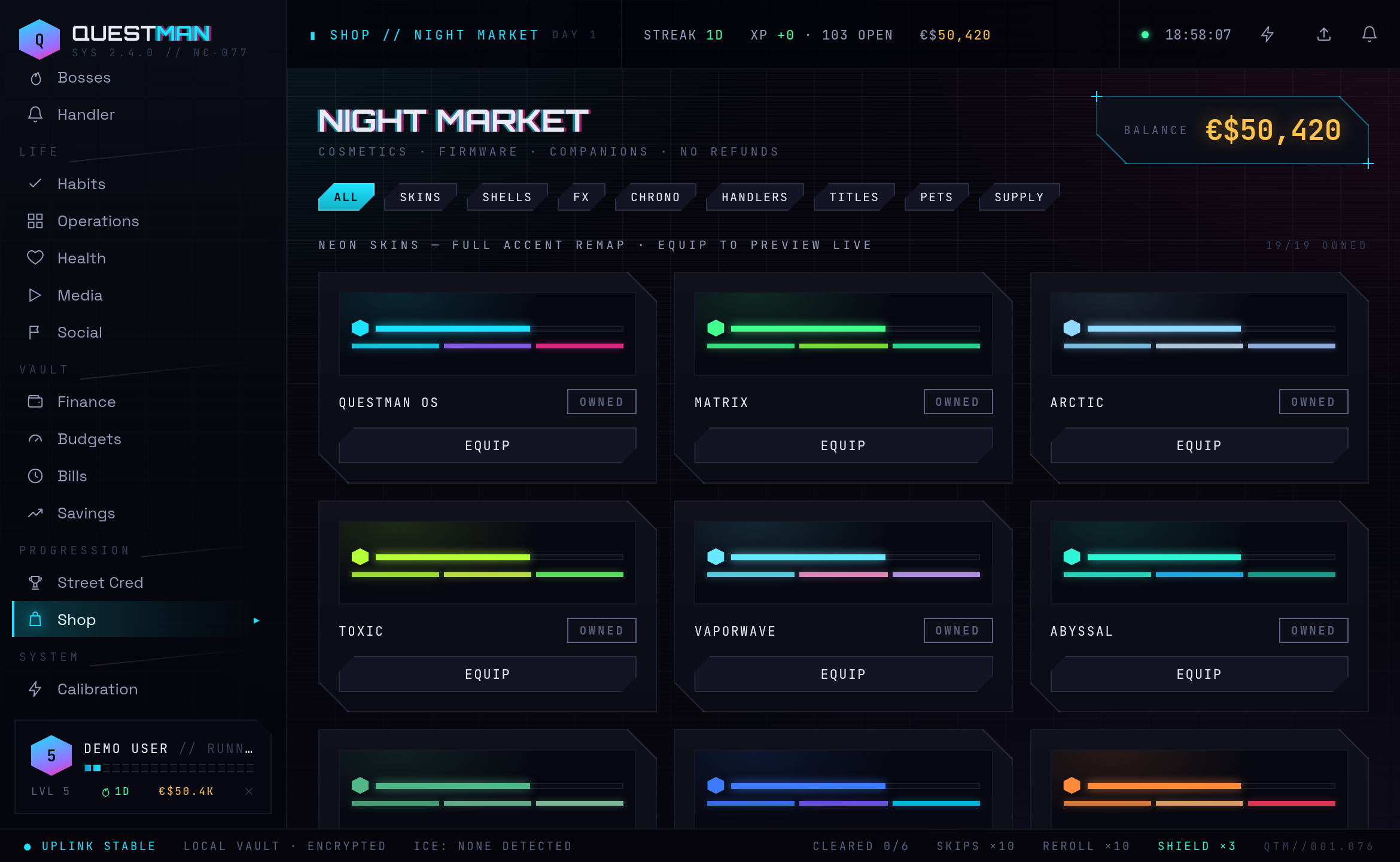
Equipping a skin remaps the whole HUD's accent palette instantly. Here is the Today board under the Synthwave skin:
The AI layer
Everything AI in Questman is opt-in and off by default. A fresh install makes zero model calls and shares zero data. You turn it on in layers, in SYS // CALIBRATION → AI Calibration:
- Flip the AI SYSTEMS master breaker on.
- Enable the features you want: Quest Synthesis (themes and names your daily missions) and Handler Uplink (the daily rundown and weekly debrief).
- Open the per-domain data-access grants you are comfortable with. All four start sealed.
The privacy guarantee is the point here. Sealed domains are never sent to any model. Even when a grant is open, the model receives only server-computed summaries, never raw tables, files, or history. And it can never touch the economy.
| Grant | When open, the model may see | Never |
|---|---|---|
| Vault (finance) | weekly spend total, top categories, budget-running-hot and wasteful-pattern summaries | raw transactions |
| Biometrics (health) | energy tier, weekly sleep and mood averages, weight delta, workout count | full history |
| Contacts (social) | the single most-neglected contact and days since contact | the full roster |
| Grid Schedule (calendar) | commitment count, next start time, free/busy minutes | event titles, ever |
The AI only ever narrates. The server computes the facts; the model phrases them in character. The Handler is a persistent narrator with selectable personas (the free default is a sardonic rogue AI) that produces a short daily rundown and a weekly after-action debrief, and nothing else. A separate, fully deterministic insights engine (no model needed) surfaces conservative "possible pattern" findings over your recent data, like spend climbing on low-sleep days, which you can accept (spawning one small quest) or dismiss.
For the provider, you can use the Anthropic cloud (your API key makes it available, but you still flip the in-app switches) or point at a local Ollama node for zero cloud egress. A daily token cap, with a live "burned today" meter, backstops cost; once you hit it, the app falls back to its rule-based mode until midnight.
Install and run
Questman ships as a Docker Compose stack today. That is the only supported install path for now (see the roadmap for where packaging is headed).
You will need Docker with the Compose plugin, and the code:
git clone https://github.com/bhinks/questman
cd questman
Quick start:
- Copy the environment template:
cp .env.example .env - Edit
.envand set the three required values: JWT_SECRET(generate one withopenssl rand -base64 48)HUB_USER_EMAIL,HUB_USER_PASSWORD,HUB_USER_NAME(your login, provisioned on first boot)TZ(your real timezone, e.g.America/New_York, so the day rolls over at local midnight)- Build and start it:
docker compose up -d --build - Open
http://localhost:8080and click JACK IN with your credentials.
Everything beyond those three values is optional and degrades gracefully. If you just want to look around first, a seeded demo account (demo@questman.app / demo123) always exists, and the login screen has a DEMO button that drops you into a fresh sandbox with no account.
Operating it
docker compose up -d --build      # start, or rebuild after a code or .env change
docker compose logs -f backend    # tail the backend logs
docker compose down               # stop (your data is preserved)
docker compose down -v            # stop and WIPE the data volume (fresh slate)
After you edit .env (especially TZ), re-run docker compose up -d --build so the change takes effect.
To hack on it without Docker, run npm run dev in both backend/ and web/ (backend on :3001, the Vite dev server on :5173), and npm run db:seed in backend/ to recreate the demo account.
Configuration
All settings live in .env, copied from .env.example, where every variable is documented inline. Unset optional variables simply turn their feature off; the app never blocks on a missing one.
Required
| Variable | What to set |
|---|---|
JWT_SECRET |
32+ random characters: openssl rand -base64 48. Sign-in tokens are signed with it. |
HUB_USER_EMAIL / HUB_USER_PASSWORD / HUB_USER_NAME |
Your login. Created on first boot; re-runs do not reset the password. |
TZ |
Your IANA timezone. Defaults to UTC. A wrong value rolls the day over at the wrong time. |
Optional, by feature
Anything you leave unset simply turns that feature off. The app never blocks on a missing value.
AI. The key alone enables nothing; you opt in from the in-app AI Calibration panel. Prefer to keep everything on-box? Skip the key and point at a local Ollama node in that same panel.
| Variable | What it is |
|---|---|
ANTHROPIC_API_KEY |
Your key from the Anthropic console. Makes cloud AI available; you still flip the breakers in the app. |
ANTHROPIC_MODEL |
Default cloud model. Defaults to claude-opus-4-8; claude-sonnet-4-6 or claude-haiku-4-5 are lighter and cheaper. |
AI_QUESTS |
Set to false to force rule-based quests even when a key is present. |
Weather-aware chores. Uses Open-Meteo, no key required.
| Variable | What it is |
|---|---|
HUB_LAT / HUB_LON |
Your hub's latitude and longitude in decimal degrees (both required). Outdoor chores then only surface when their weather rule passes, and the planner picks the best window. |
Calendar. Read-only.
| Variable | What it is |
|---|---|
CALENDAR_ICS_URL |
One or more comma-separated private ICS feed URLs. Shrinks the planner's budget by your real busy time and adds a schedule agenda. For Google Calendar, use the "Secret address in iCal format" and treat it like a password. |
Health sync. Pairs with the health-connect-webhook Android app. Steps, sleep, heart rate, weight, blood pressure, and hydration map onto your daily vitals. Pull mode is recommended for a plain-HTTP hub.
| Variable | What it is |
|---|---|
HEALTH_PULL_URL |
The phone's address in pull mode (turn on the app's Local HTTP Server). The recommended route for a plain-HTTP hub. |
HEALTH_PULL_TOKEN |
Bearer token, if you secured the phone's Local HTTP Server. |
HEALTH_PULL_MINUTES |
How often to poll the phone, in minutes. |
HEALTH_BACKFILL_DAYS |
How much history to pull on the first sync. |
INGEST_TOKEN |
Shared secret for the push endpoints, used instead of pull mode when your hub is HTTPS. |
Media estimation. Books work keyless via Open Library. Each source falls back to manual entry when unset.
| Variable | What it is |
|---|---|
TMDB_API_KEY |
TMDb key, for movie and show length estimates. |
TWITCH_CLIENT_ID / TWITCH_CLIENT_SECRET |
Credentials for a free Twitch app, used for IGDB game-length estimates. |
Networking.
| Variable | What it is |
|---|---|
WEB_PORT |
Host port the web UI is served on. Defaults to 8080; change it if that port is taken. |
JWT_EXPIRES_IN |
How long a login stays valid. Defaults to 30d. |
Accessing it
- Locally, at
http://localhost:8080(or yourWEB_PORT). - From your phone on the same network, browse to
http://<hub-machine-ip>:8080. The interface is mobile-shaped, with a bottom nav bar and a slide-up MORE sheet for the screens that do not fit it. - Remember me issues a token lasting
JWT_EXPIRES_IN(30 days by default), so you stay signed in across visits.
For access from outside your home, the intended path is a mesh VPN like Tailscale rather than exposing the hub to the open internet. There is one writable database, and it stays on your hardware.
Backup
All of your data is a single SQLite file (questman.db) on the Docker named volume questman-data. Backing up means copying that file. With the stack stopped, you can pull it out of the volume like this:
docker run --rm -v questman-data:/data -v "$PWD":/backup alpine \
  cp /data/questman.db /backup/
Note that docker compose down -v deletes the volume and everything in it, so take a backup before you do that.
Troubleshooting
- The day rolls over at the wrong time, or quests look off by a day.
TZis not set to your real timezone (the Docker default isUTC). Fix it in.envand rebuild. - The health webhook fails with "CLEARTEXT not permitted" on Android. Android blocks the app from posting to a plain-HTTP hub. Switch to pull mode: enable the phone app's Local HTTP Server and set
HEALTH_PULL_URL. The backend polls the phone, which has no such restriction. - AI still seems off after adding an API key. The key alone enables nothing. Open SYS // CALIBRATION, flip the AI master breaker on, enable Quest Synthesis and Handler Uplink, then open the data grants you want.
- AI quietly stopped and quests look generic. You probably hit the daily token cap, so it fell back to rule-based mode until midnight. Raise the cap in the AI Calibration panel.
- Port 8080 is already in use. Set
WEB_PORTto a free port and rebuild. - Health pull stops working after a while. Your phone's LAN IP changed. Give it a DHCP reservation in your router and point
HEALTH_PULL_URLat the fixed address. If the phone server has auth on, setHEALTH_PULL_TOKENto match. - The first few days feel empty. That is expected. Insights need about two weeks of data and the weekly debrief needs a full week before they have anything to say.
- "Too many requests" on login. The auth and ingest endpoints are rate-limited; wait a moment and retry.
Current state and roadmap
Questman is functional and feature-rich, not a prototype. I use it daily, and nearly the entire original vision is built: the daily loop and planner, every life module, the two-currency economy with overclock and shop, boss fights, the finance depth, and the opt-in AI layer. It is still actively iterated, and it is not yet turnkey for someone who has never touched Docker.
Planned, but not shipped yet:
- Easier packaging. The big one. The plan keeps Docker but adds a thin PWA and a desktop app that bundles the whole hub via Electron, with mobile as a thin client. Right now, setup takes a little elbow grease.
- Backup and export. A one-button portable export and scheduled snapshots are designed but not built.
- Push notifications for best-window and bill-due nudges.
- Quick capture. The app is strong at executing a pre-built day and weaker at capturing new input on the fly. A fast "add to today" affordance is the top usability gap on my list.
- Data pets and avatars, which are waiting on an image model to generate them.
A couple of things are deliberately out of scope: direct bank or account integration (I want finance to stay file-upload only) and two-way calendar sync (it stays read-only, because the app should tell you what to do, never when).
The code is public at github.com/bhinks/questman. Take it, run it, fork it, or tell me what is broken.