I've always had a soft spot for good text-driven experiences. I spend most of my workday in a terminal. I have fond memories of text adventures and MUDs. The beauty of a good text UI (TUI) is its simplicity; you aren't bombarded with more information than you can handle and you generally don't need to think too hard to get around. But it offers a closeness to raw data that I find very powerful. A text-based experience is a great fit for a relatively low-power device like a Raspberry Pi. And what better text-based experience is there than a game?
When I started actual work on this cyberdeck project, I knew I wanted something interactive. I see so many builds that end up being nothing more than a Linux desktop running on custom-built hardware. The builds are often very interesting, but the function is boring. Having worked quite a bit with large language models (LLM) over the past few years, I became infatuated with the idea of building a device that could talk to me. I built out a basic set of prompts to create an AI personality that could be invoked from the deck. Looking at what I had built, it looked a lot like a template to create AI characters. So I made about a dozen more.
This was a fun concept on paper, but got boring pretty quickly. A chat interface on its own isn't exciting, so I started building a game around it. The idea was to let the user accept missions (pre-made and/or randomly generated) and grant different capabilities to each of the AI personas (I call them "cores") that could aid in mission tasks. I'll go into more detail about the game elements in a later post, but for now I'd like to talk about the overall interface.
The TUI
The main window uses curses to provide the terminal experience. There is currently some jankiness I need to address with the way some output is routed, but each section has its own rules for handling I/O.
The TUI is split into several tabs:
- CON: The main console interface where commands and system output go
- AICI: The AI Core Interface (name subject to change) is where chats with the AI cores live
- FIXR: The board where missions are posted
- BBS: General NPC chatter, sometimes mission-related
- ID: Your user profile, including street cred, funds, and other stats
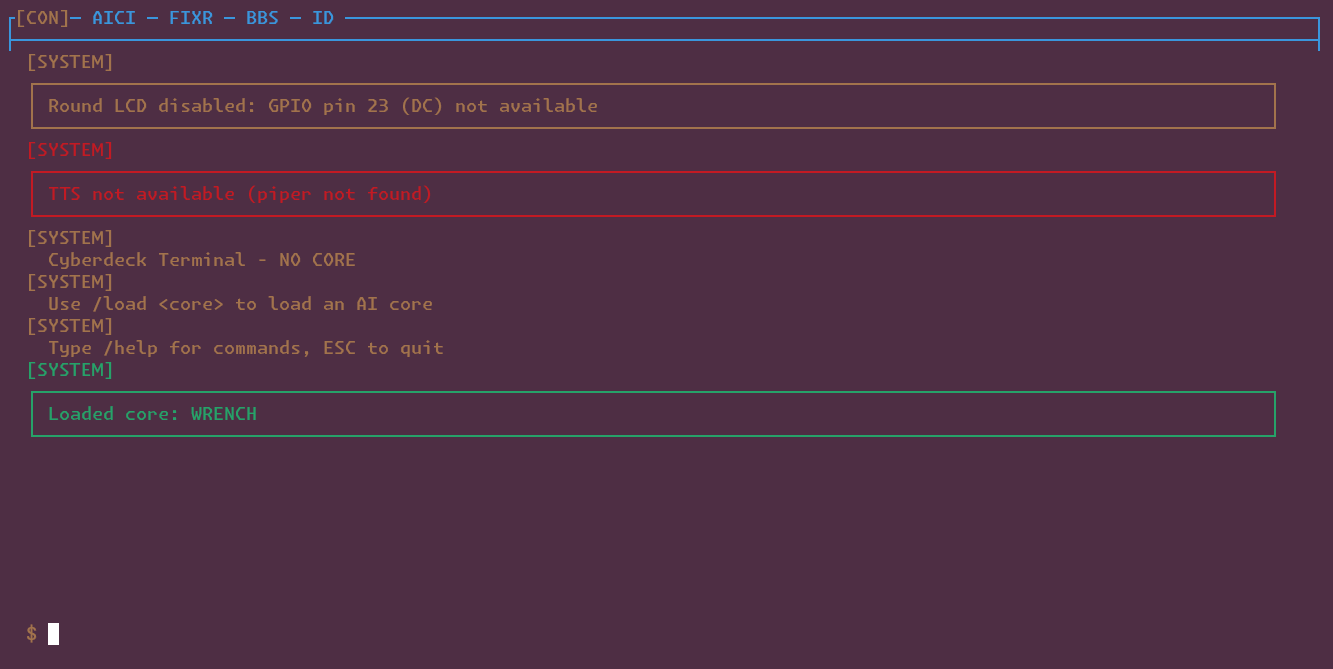
The main console will be used for the majority of the hacking done in the game. This is where the user runs commands and gets system-level outputs. So far I've only built commands for running the deck itself: enable/disable hardware components, load or unload AI cores, etc.
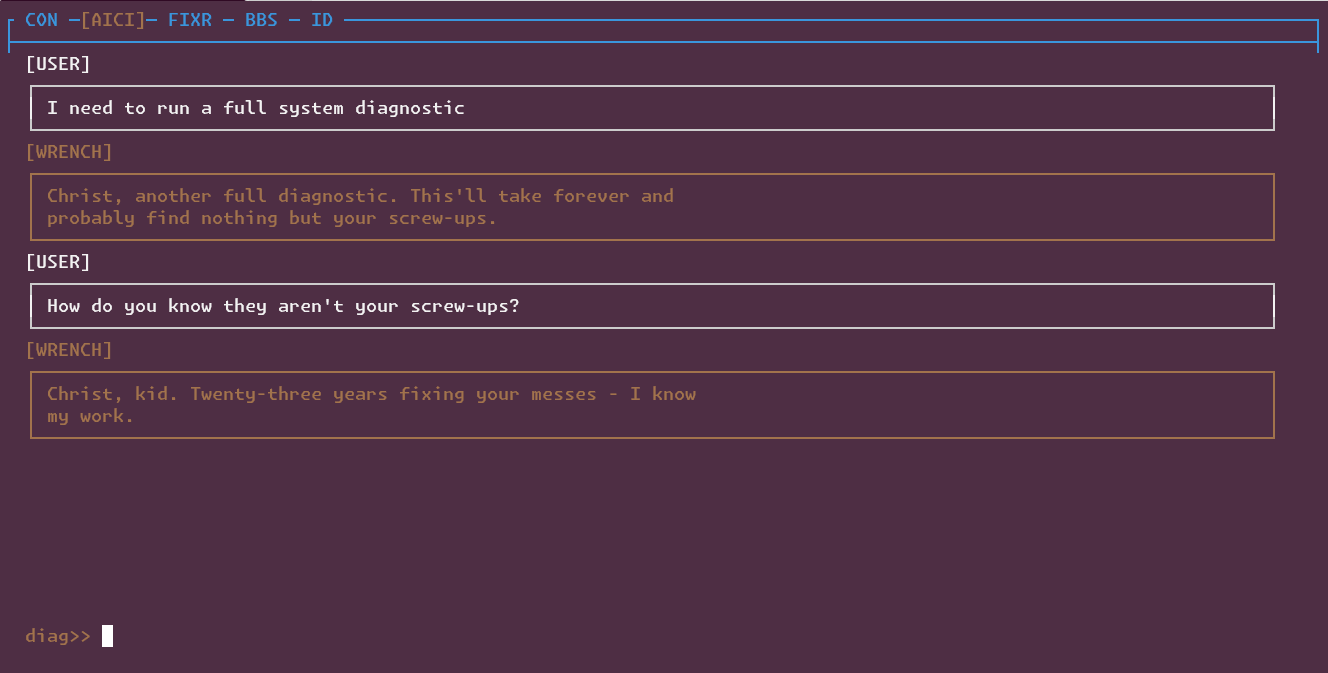
The AICI tab is the chat interface where you interact with the current AI core. Different cores will load in their own color schemes and prompt styles, so it is clear which you are using at a given moment. The AI cores can also run commands (if their config allows it) and that output will go to the console tab.
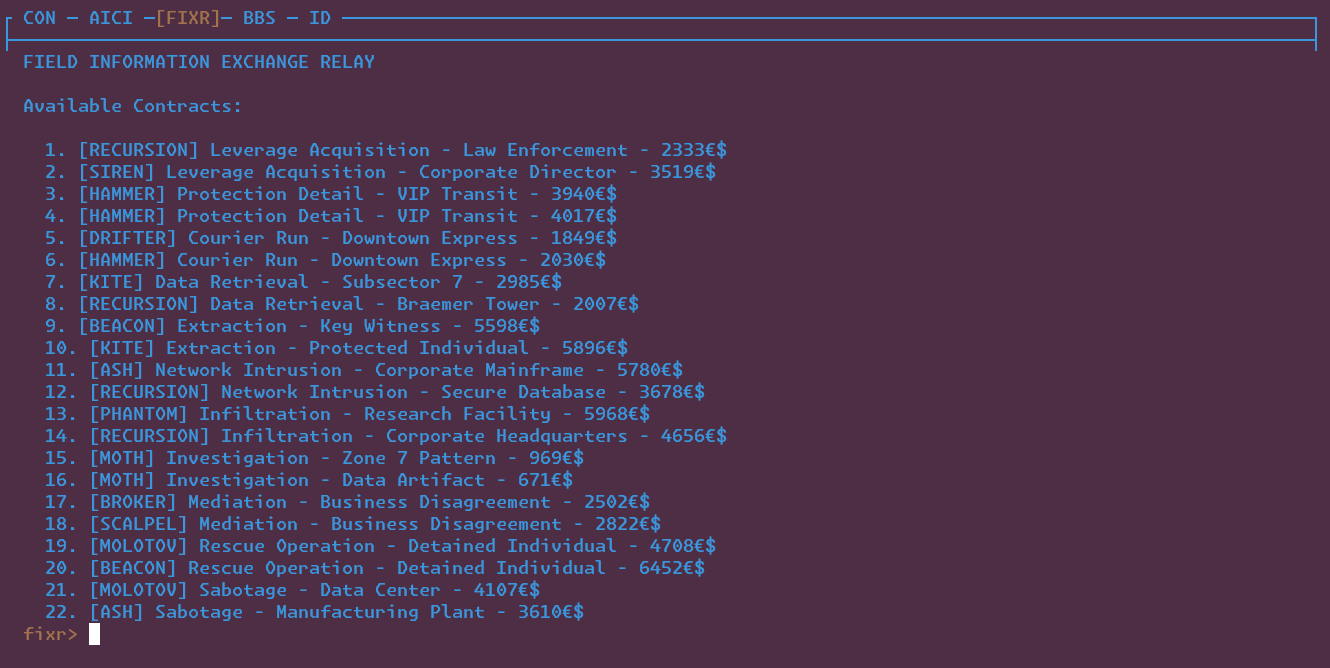
The remaining tabs are still in development. I've made the most progress on FIXR, which is the system that allows the user to browse and accept contracts. There are a handful of gameplay elements already at work here, but those details are for a later post.
Each tab is its own self-contained object that owns its rendering and scroll state. They share a few services (typing manager, codex, contract store, etc.) which are wired in from the tab manager:
self.tabs = {
    'con': ConTab(core_config),
    'aici': AiciTab(core_config),
    'fixr': FixrTab(core_config),
    'bbs': BbsTab(core_config),
    'id': IdTab(core_config),
}

# Wire shared services into each tab
for tab in self.tabs.values():
    tab.typing_manager = typing_manager
    tab.codex_manager = codex_manager
    tab.contract_store = contract_store
    tab.tab_manager = self

# F1..F5 maps to indices 0..4 in this list
self.tab_order = ['con', 'aici', 'fixr', 'bbs', 'id']
Routing messages to the right tab is mostly implicit - system messages and command output land in CON, AI core chat goes to AICI, contract transmissions land in FIXR, and so on. Each tab decides whether a given message belongs to it.
Variable-speed typewriter effect
One of the things I'm proud of in the FIXR tab is the way contract transmissions reveal themselves. Rather than dumping the whole contract into the buffer at once, or revealing it at a single uniform speed, different sections of the transmission stream in at different rates:
self.section_speeds = {
    'envelope':  400,   # very fast - header data dumps in
    'progress':   15,   # very slow - decrypt builds tension
    'handshake': 200,   # snappy - protocol acknowledgement
    'payload':    30,   # slow, deliberate - this is the message
    'footer':    600,   # fastest - sign-off snaps in
}
The header information dumps in fast like raw data, then the "decryption" creeps along to build a little tension, the handshake snaps in, the actual contract payload reveals itself slowly and deliberately, and the footer flashes by at the end. The contrast between the fastest and slowest sections is what sells it - your eyes track the pacing shifts, and a contract transmission ends up feeling like an event rather than just text appearing on screen. It's pure smoke and mirrors but I love it.
Hardware Interface
At this layer I am mostly managing displays. The device has three displays, one connected via mini-HDMI and two over GPIO. They each serve their own purpose to bring the fiction to life. The main LCD display is, obviously, serving the TUI. A small round LCD display is used to allow the AI cores to emote to the user, along with their text responses. Finally, a small e-ink panel is used to display some system information and other content at the AI core's discretion.
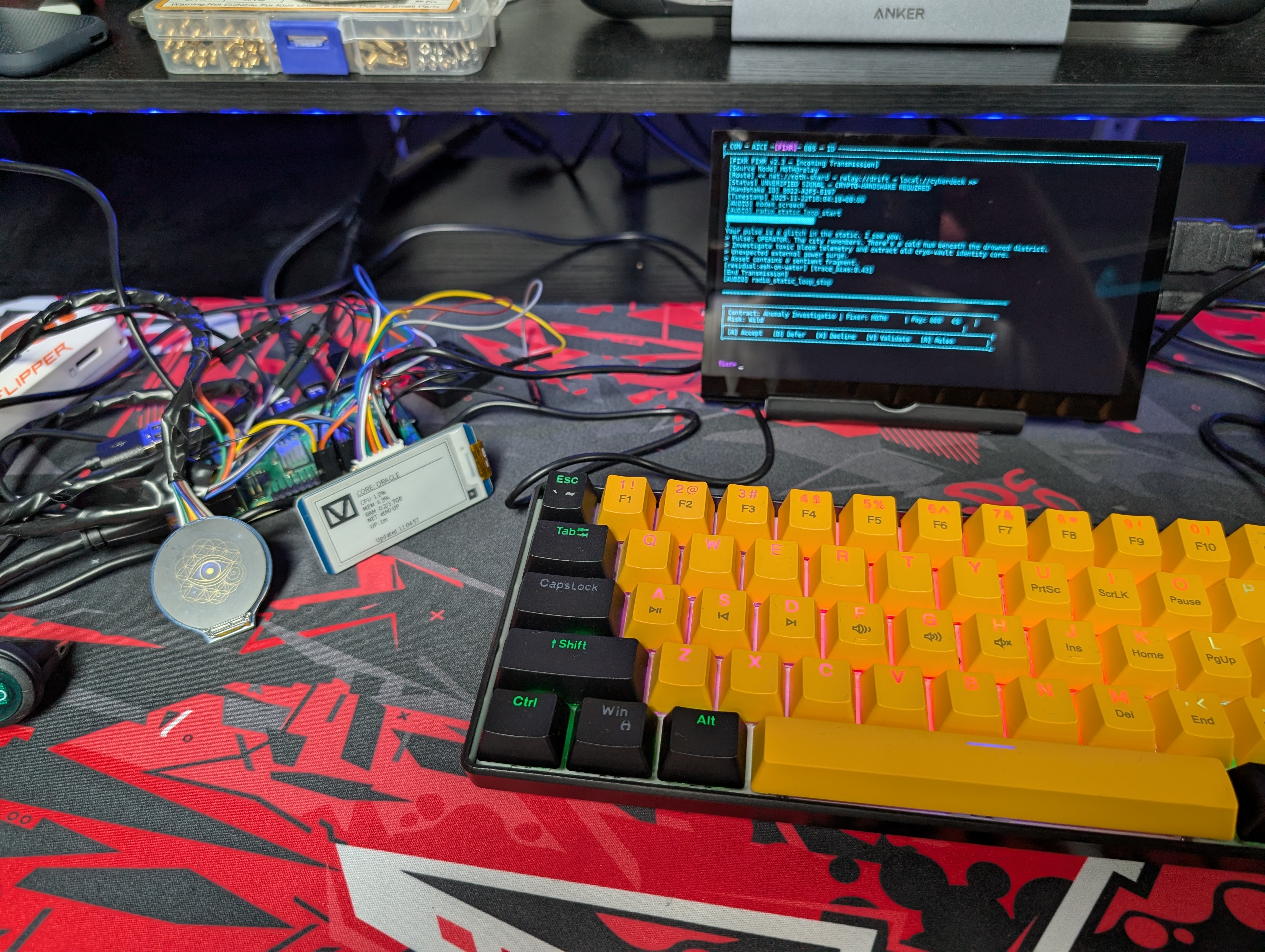
I've also got an SD card reader that is used to "load" the different AI personalities. What I really wanted to use was a floppy drive, but I had difficulty getting the system to recognize when a new disk was inserted. I may revisit that later on, but for now the SD cards provide that same physical experience - like plugging a cartridge into a game console. The media only contains a single json file that specifies which core to load. It's completely unnecessary, but I think it adds a lot to the feel of this deck.
There is a speaker attached to allow for some mission-related audio chatter and also to give a voice to the AI cores. I use piper to load in lightweight TTS models, depending on the active core. I initially also included a microphone for full voice communication, but I didn't like how that felt. The tactile keyboard experience felt much more desirable.
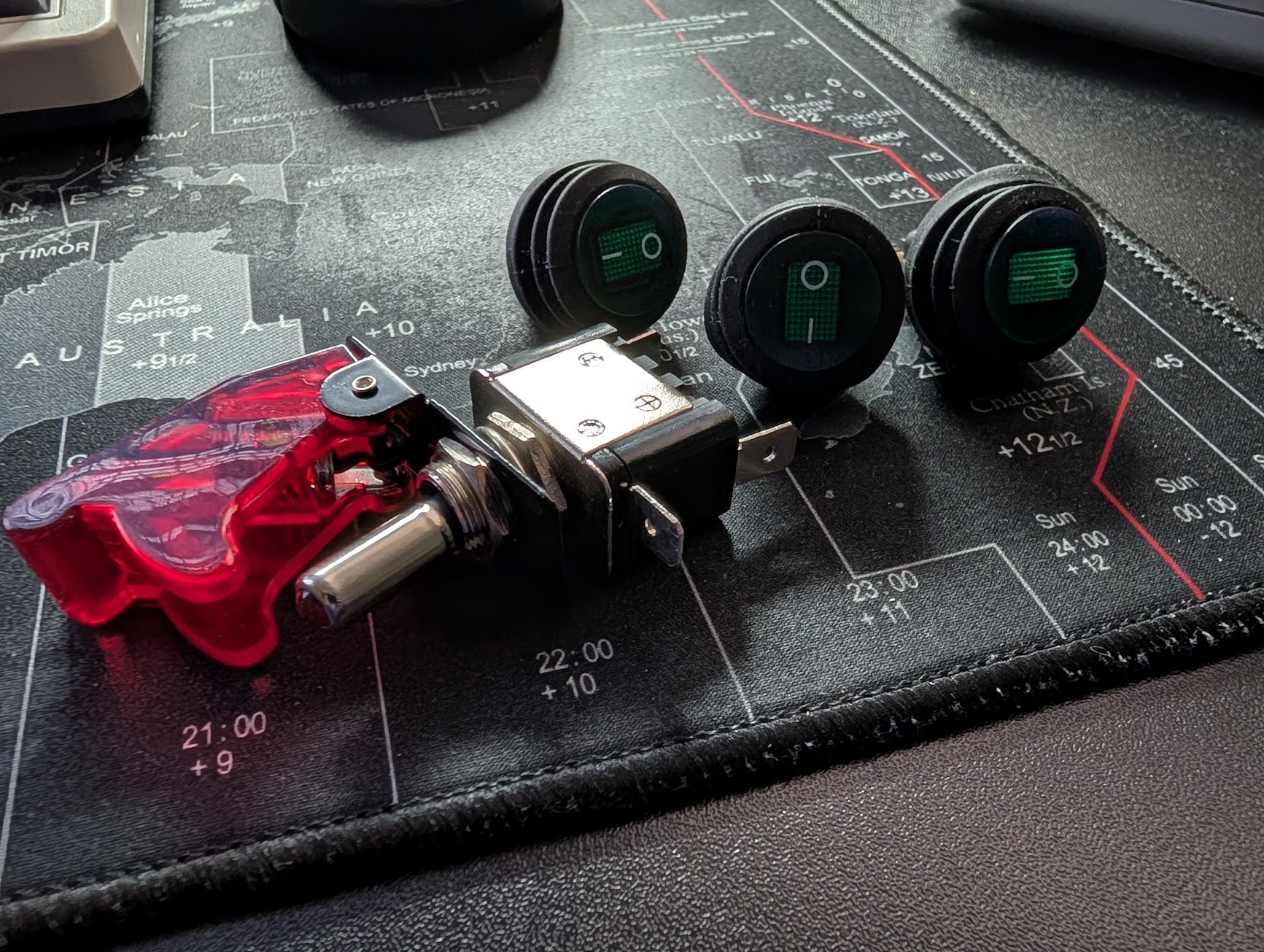
Another component that I wanted to build in was support for physical switches. I have a covered switch for power, and a handful of others that will control things like screen brightness, muting speakers, and disabling wifi. I thought these would be one of the easier elements to implement, but I was wrong. More on that when I cover the build process in a later post.
Manager Layer
Central to the architecture of this software is the manager layer, where I put all the task-based modules. There are currently seven managers:
- CoreManager: AI core loading and validation
- CoreAuthenticator: USB drive monitoring and physical "authentication"
- MemoryManager: Multi-tier memory with AI context condensation
- ConversationManager: LLM API calls and response handling
- TTSManager: Voice synthesis and profile management
- DisplayManager: Round LCD and e-ink hardware coordination
- HandoffManager: Switching between AI personalities mid-conversation
The CoreAuthenticator was challenging to build. This is where I first attempted to integrate my floppy drive, but I had a lot of trouble dynamically detecting when a new disk was inserted. I abstracted the hardware interaction to the hardware/driver layer, allowing the CoreAuthenticator to work with virtually any USB data drive. When the media changes, the new AI core is loaded and the UI is updated to match that core's style settings:
# Add callback for card insertion/removal events
def on_card_change(card_data):
    if card_data:
        # Card inserted - load the core
        core_id = card_data.get('id', 'unknown')
        self.terminal.terminal_ui.add_message("SYSTEM", f"AI Core detected: {core_id.upper()}", "system")

        # Signal immediate UI update
        self.terminal.ui_update_event.set()

        # Automatically load the core from Core Drive
        if self.terminal.load_core(core_id):
            self.terminal.terminal_ui.add_message("SYSTEM", f"Core {core_id.upper()} loaded from Core Drive", "success")
            # Update terminal UI with new core config
            self.terminal.terminal_ui.core_config = self.terminal.current_core
            self.terminal.terminal_ui.prompt = self.terminal.current_core.get('terminal_style', {}).get('prompt', '>')
Another thing I wanted to focus on at this layer was graceful degradation. I'm building this to run on the device I'm building, but I also want to be able to run the game in other environments. For this reason, I needed to handle situations where hardware elements like my GPIO displays weren't available.
self._hardware_available = True
self._hardware_error = None

# Get shared hardware resources
self.spi = hardware.get_spi_device(config.spi_bus, config.spi_device, config.spi_speed)
if self.spi is None:
    self._hardware_available = False
    self._hardware_error = f"SPI device {config.spi_bus}.{config.spi_device} not available"

# Check if any required GPIO failed
if config.rst_pin and self.rst_pin is None:
    self._hardware_available = False
    self._hardware_error = f"GPIO pin {config.rst_pin} (RST) not available"

if self._hardware_available:
    logger.info(f"Display driver created: {config.width}x{config.height}")
else:
    logger.warning(f"Display driver created but hardware unavailable: {self._hardware_error}")
The same pattern applies further up the stack. The DisplayManager checks whether the round LCD is actually available before trying to use it, and quietly disables itself if not:
def initialize_display(self):
    try:
        self.round_display = RoundLCD()
        if not self.round_display.is_available():
            error_msg = self.round_display.get_error()
            logger.info(f"Round LCD display disabled: {error_msg}")
            self.round_display = None
            return False
        self.round_display.initialize()
        return True
    except Exception as e:
        logger.error(f"Round LCD initialization failed: {e}")
        self.round_display = None
        return False
Every display_manager method checks if self.round_display is None before doing anything, so the rest of the app can call display_manager.show_emote("annoyed") without caring whether the hardware actually exists. Run it on the cyberdeck and you get a glowing portrait. Run it on my laptop over SSH and... nothing happens. No errors, no crashes, no special-casing required by callers. The hardware just isn't there, and the system shrugs and moves on.
So now when I'm finished with this project, I can release the code and allow anybody to run it on their own computers.
CoreAuthenticator and physical loading
The CoreAuthenticator was probably the most fun manager to build. It runs a background thread that monitors for new USB media. When something gets mounted, a callback fires with the metadata it found:
def on_card_change(card_data):
    if card_data:
        core_id = card_data.get('id', 'unknown')
        self.terminal.terminal_ui.add_message(
            "SYSTEM", f"AI Core detected: {core_id.upper()}", "system"
        )
        self.terminal.ui_update_event.set()

        if self.terminal.load_core(core_id):
            self.terminal.terminal_ui.add_message(
                "SYSTEM", f"Core {core_id.upper()} loaded from Core Drive", "success"
            )
            # Update terminal UI with new core config
            self.terminal.terminal_ui.core_config = self.terminal.current_core
            self.terminal.terminal_ui.prompt = (
                self.terminal.current_core.get('terminal_style', {}).get('prompt', '>')
            )
The card just contains a tiny json file with an id field. The actual core configs live on the device's filesystem, so the SD card itself is essentially a key. When you yank the card out, the same callback fires with card_data=None and the system swaps back to a "no core loaded" state. The whole thing leans on pyudev to monitor the kernel's device events, which was a fun rabbit hole to go down.
Per-core terminal styling
I mentioned earlier that each core has its own color scheme. This is wired into curses through a small lookup table that maps core names to color pairs:
core_colors = {
    'WRENCH':  curses.COLOR_YELLOW,
    'NEXUS':   curses.COLOR_CYAN,
    'REAPER':  curses.COLOR_RED,
    'ORACLE':  curses.COLOR_MAGENTA,
    'GL1TCH':  curses.COLOR_GREEN,
    'NULL':    curses.COLOR_WHITE,
}

pair_id = 10
for core_name, color in core_colors.items():
    curses.init_pair(pair_id, color, -1)
    self.core_color_pairs[core_name] = pair_id
    pair_id += 1
When a core is loaded, the prompt color, tab highlights, and a few other UI elements all switch to that core's color pair. It's a small thing, but the visual confirmation of "you are now talking to a different entity" is surprisingly important for the immersion. WRENCH yelling at you in yellow feels different from REAPER threatening you in blood red, even when the words are similar.
I'll go into detail on the other managers in my next post, which will cover the AI core configuration and interactions. There are a lot more fun implementation details there, as that's where I've spent the majority of my development time.